
Help Center
Setting Default Payment Accounts for Payment Methods
You can streamline transactions in Posnets by setting default payment accounts for each payment method. Follow these steps:
1. Navigate to Business Location Settings
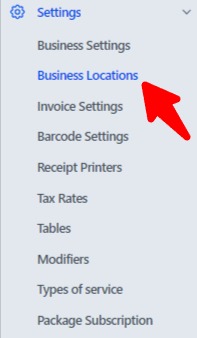
- Go to Settings in the main menu.
- Select Business Locations and choose the location you want to configure.
2. Add or Edit a Business Location
- Click Add Location to create a new business location or Edit an existing one.
3. Select Default Payment Accounts

- In the payment settings for the business location, assign a default payment account to each payment method:
- Example Payment Methods:
- Cash
- Bank Transfer
- Credit Card
- Digital Wallet
- Example Payment Methods:
- Choose the relevant payment account for each method from the dropdown menu.
4. Save the Settings
- Click Save to apply the default payment account settings for the selected business location.
5. Automatic Payment Account Selection
- Once linked, the default payment account will be automatically selected when:
- Adding payments for sales.
- Recording purchases.
- Logging expenses.
- This eliminates the need to manually select a payment account for each transaction.
By linking default payment accounts to payment methods, Posnets ensures faster and more efficient transaction management, reducing errors and saving time.