
Help Center
Posnets Invoice Scheme
An Invoice Scheme in Posnets is a format that defines how invoice numbers are generated. You can assign different invoice schemes to various locations or storefronts to help you identify them more easily. Here's how to work with invoice schemes:
1. Why Use Invoice Schemes?
- Organized Identification: Assigning unique invoice schemes to different locations helps you distinguish invoices generated at each location.
- Customization: You can create schemes that reflect the business location, branch, or type of transaction.
- Flexibility: Use a single invoice scheme across multiple locations or create specific ones for each location.
2. Creating a New Invoice Scheme
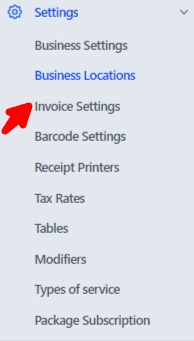
- Navigate to Settings in the main menu.
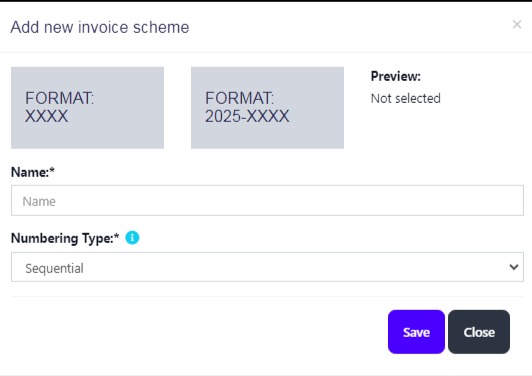
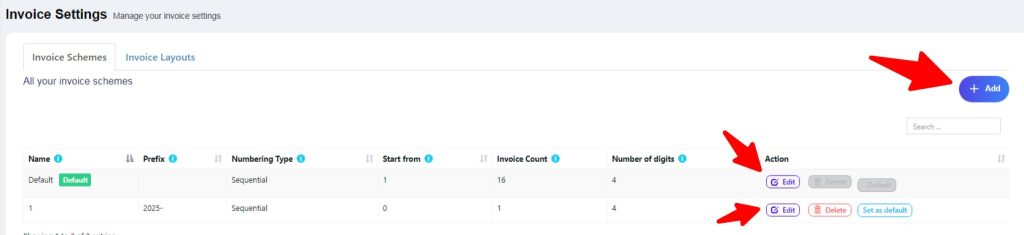
- Go to Invoice Schemes and click Add Invoice Scheme.
- Define the invoice number format. For example:
- {LOCATION_CODE}/{YEAR}/{NUMBER}
- Example Output:
LOC1/2025/0001
- Example Output:
- {LOCATION_CODE}/{YEAR}/{NUMBER}
- Save the scheme.
3. Assigning Invoice Schemes to Locations
- Go to Business Locations in the settings.
- Select a location and click Edit.
- Assign the desired invoice scheme from the dropdown menu.
- Save the changes.
4. Tips for Effective Use
- Consistency: Use a consistent structure across schemes for easier tracking.
- Specific Identifiers: Include location codes, year, or other unique identifiers in the scheme.
- Test the Scheme: Before applying a scheme, generate test invoices to ensure the format works as intended.
By setting up invoice schemes in Posnets, you can streamline invoice management and improve organization across your business locations.